Last Stop Roblox Classes: Every Class in the Menu and How Unlocking Works
The Last Stop class menu explained: which classes are listed, what In Stock and the Reroll timer show, and the Ticket, Robux and Ocean Spin unlock routes.
FAQ
How many classes are there in Last Stop?
How much does a class cost in Last Stop?
What does the Necromancer class do in Last Stop?
Why does my class menu say Out of Stock?
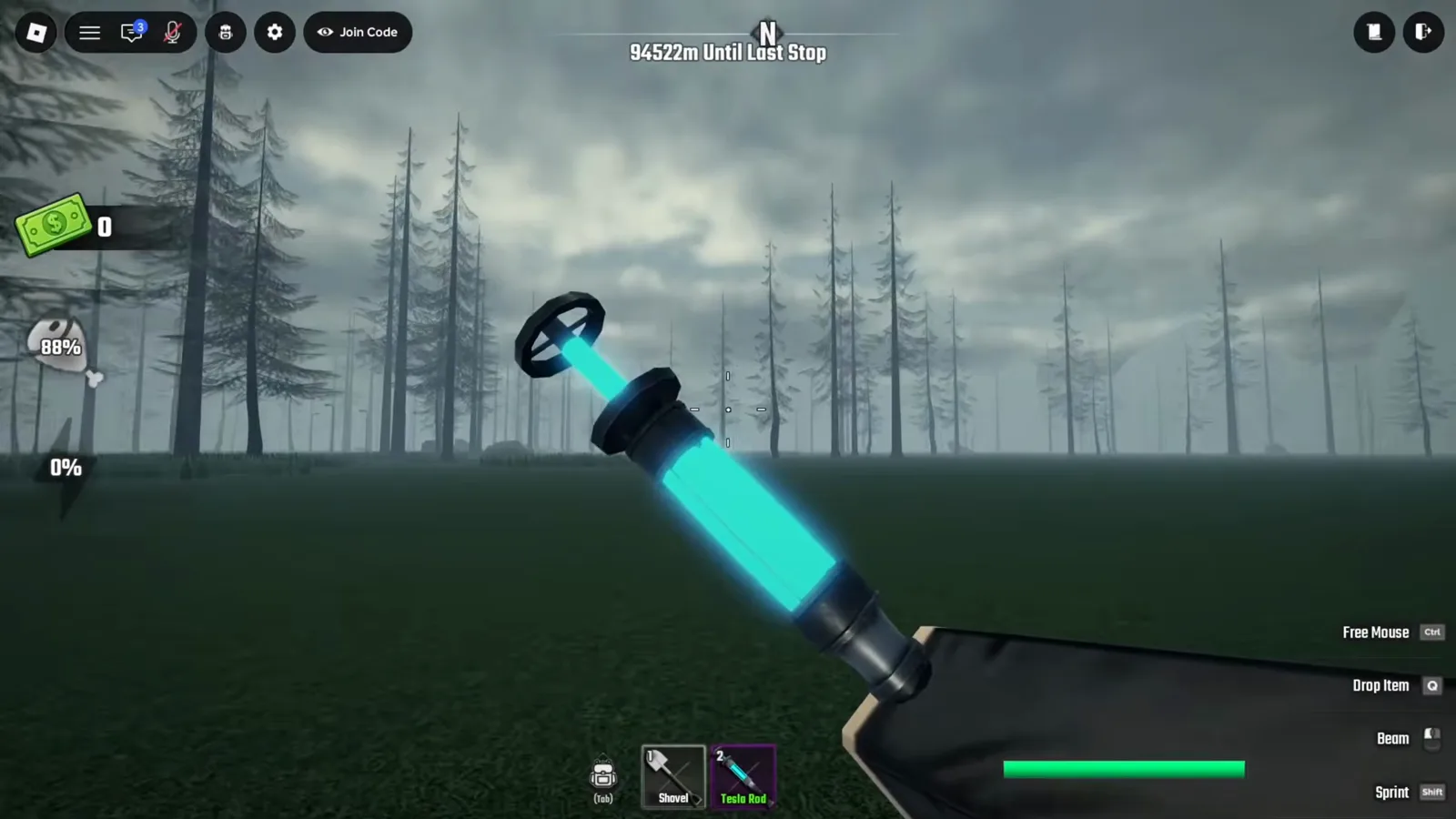
Is the Tesla Rod a class item in Last Stop?
Which class should I pick first in Last Stop?
What is the class menu in Last Stop?
Classes live behind the CLASSES button in the lobby’s left-hand menu panel, above VAULT, BADGES, PROFILE and JOIN. Open it and the screen splits into three parts: a scrollable roster column on the left, the selected character standing in the middle under your Ticket balance, and a detail panel on the right.
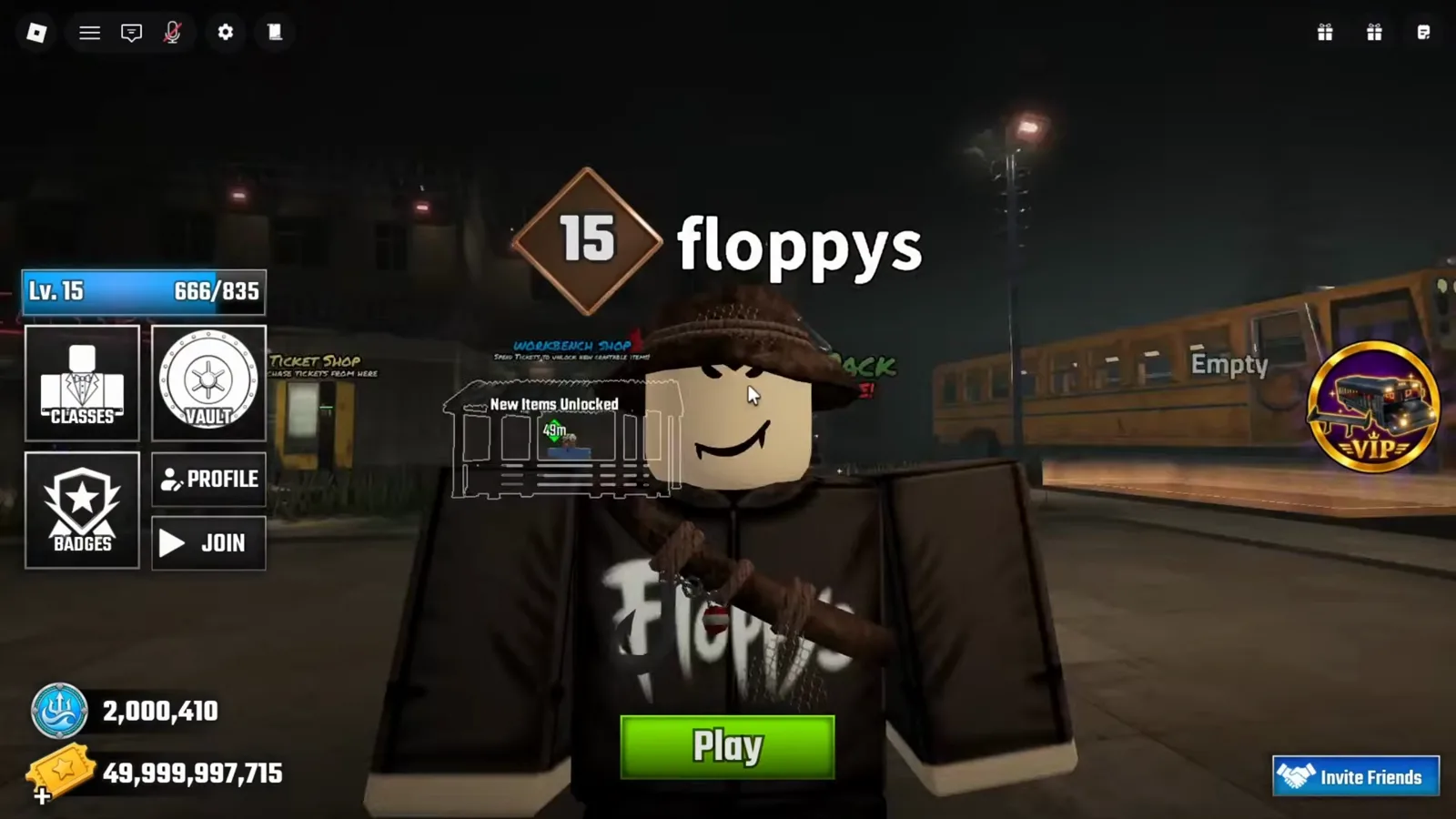
The avatar above is the useful part: the class you are wearing follows you back out to the lobby, hat, sash and hook included. As for what a class is, the game never says in the footage we checked. What the cards do show is a consistent shape — a Starter Pack item you spawn holding, plus three Level rows describing what improves.
Which classes does the roster list?
Seven class names are legible in the 19 September footage. Each row carries a star rating and, in every case but one, a stock label.
| Class | Stars | Stock label as shown |
|---|---|---|
| Ninja | 4 | Out of Stock |
| Vampire | 4 | Out of Stock |
| Ghoul | 5 | Out of Stock |
| Electrocute | 4 | In Stock |
| Pirate | 4 | no stock label at all |
| Aquatic | 3 | Out of Stock |
| Necromancer | not visible | not visible — only its card is shown |
Two honesty notes. The roster column scrolls: its position shifts by a row between the frames above and below it, the scrollbar thumb fills only part of its track, and one row cut off above Ninja never becomes readable — so this is what the footage reveals, not the complete roster, and we will not publish a total count. And the Alien Class is a token-spin prize whose odds and acquisition our new buses guide and Alien Tokens guide already handle; it does not appear in this column.
How do you unlock a class — Tickets, Robux, or the spin?
The four cards opened in this footage put four different things where a price should be.
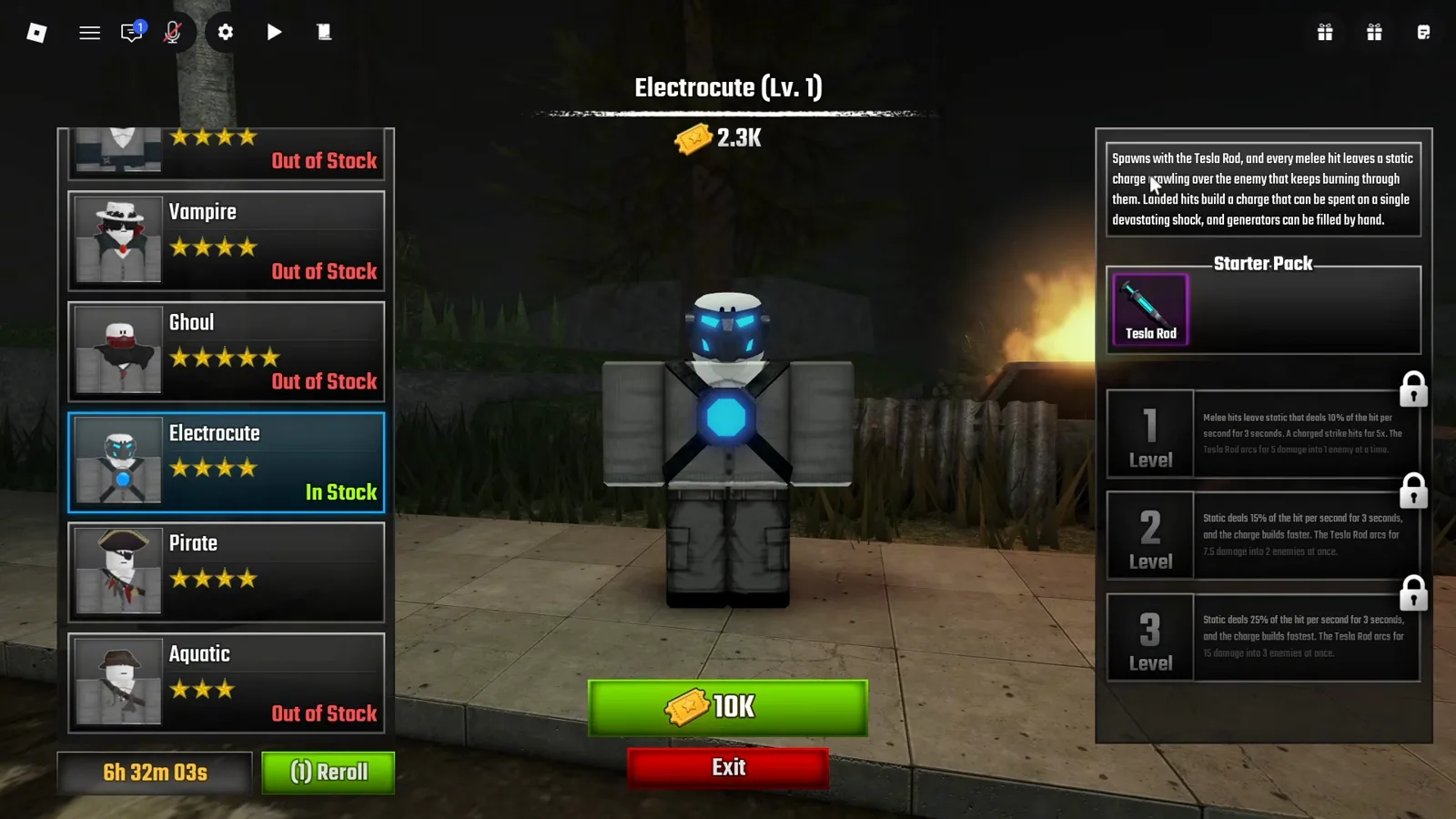
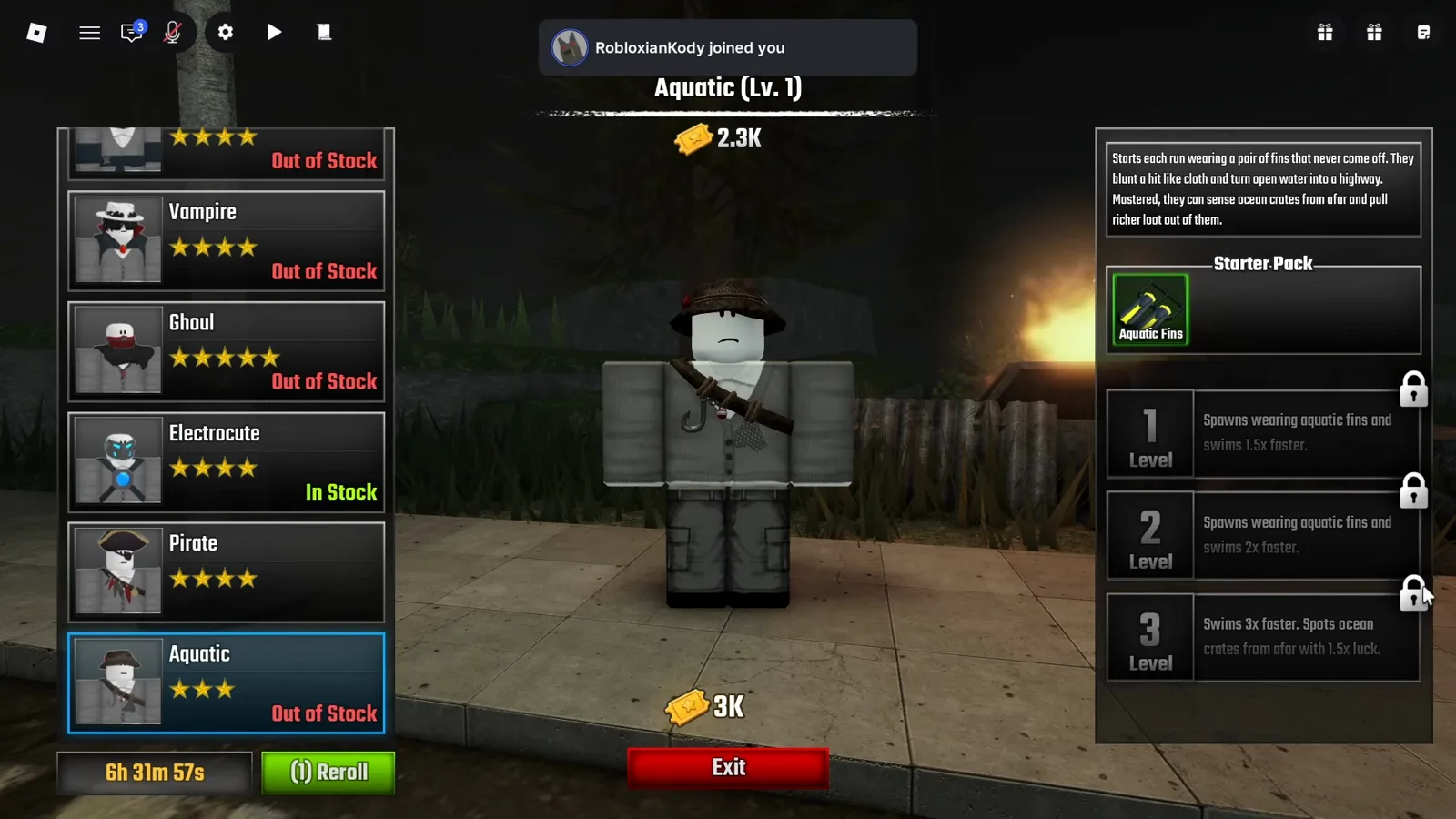
Electrocute is the only In Stock class in the footage, and it is the only one whose price sits inside a solid green button: 10K next to the yellow star-stamped Ticket icon. Aquatic asks 3K Tickets, but the number floats as bare text with no button behind it — the same readout without the affordance.
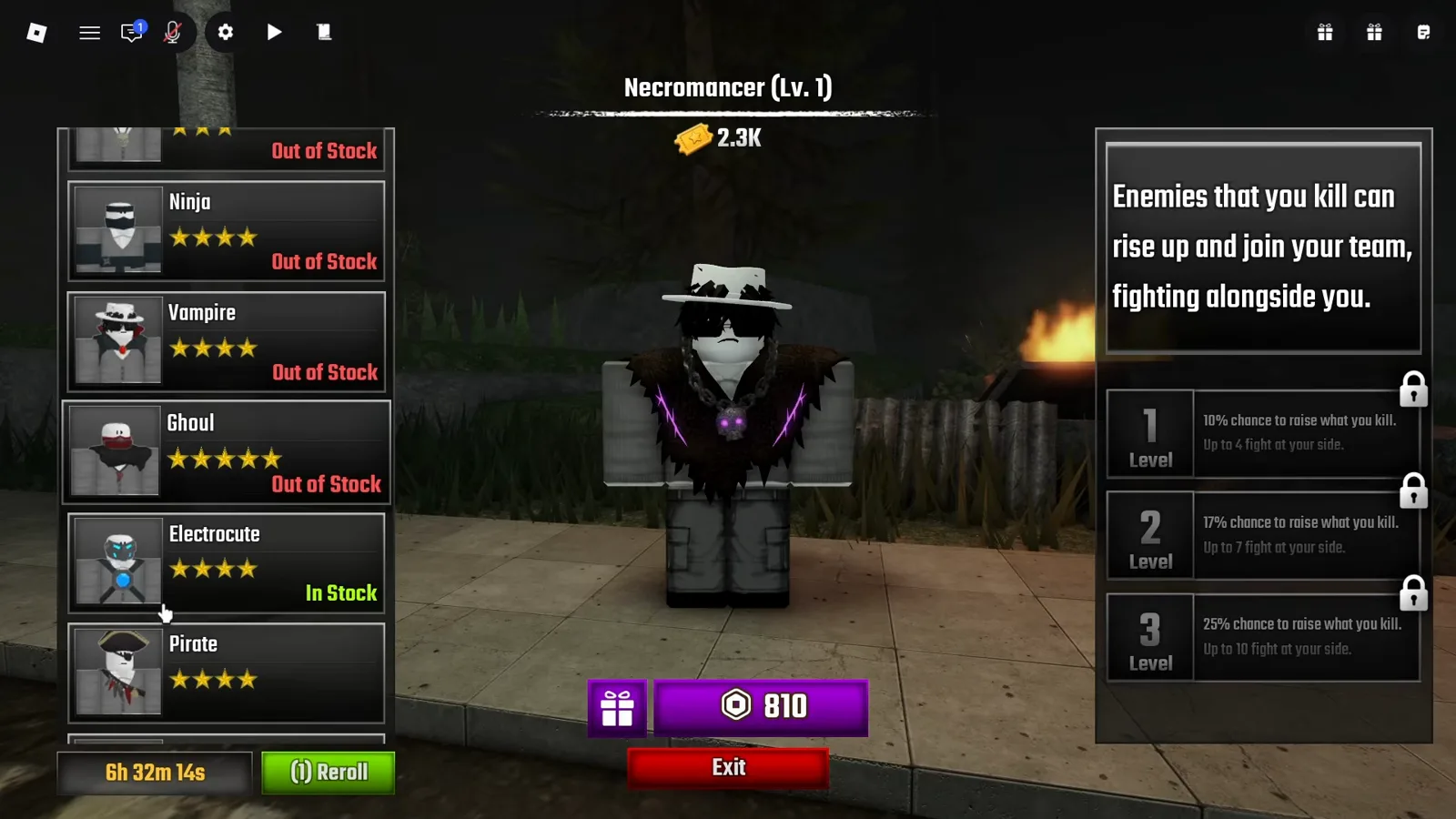
Necromancer breaks the pattern entirely: its button is purple, carries the hexagonal Robux icon, and reads 810. It is the only Robux-priced class in our footage, and the only card that shows no Starter Pack section at all — its description box is simply larger.
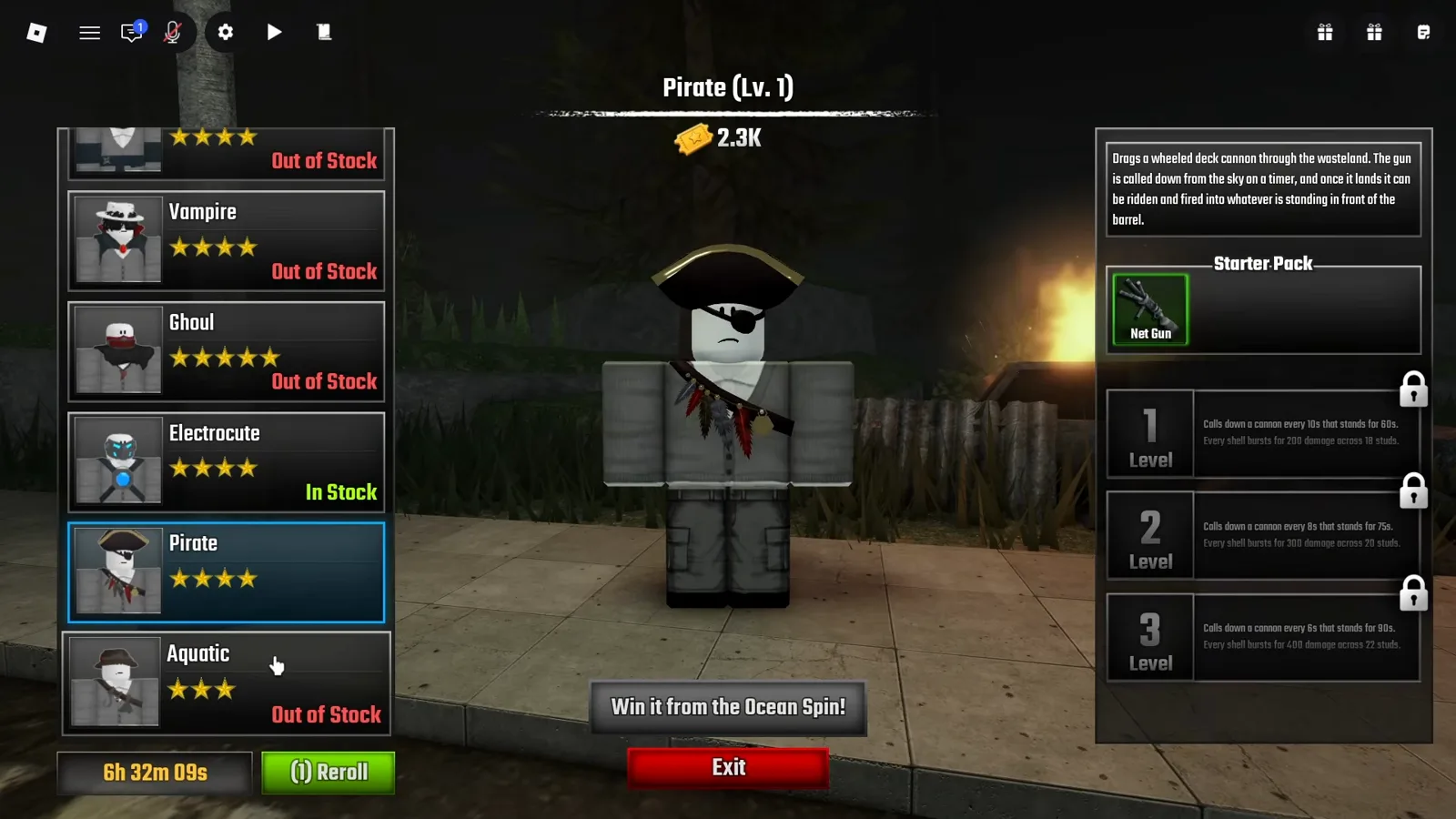
Pirate has no price anywhere on its card. Where the buy button would be sits a grey plate reading “Win it from the Ocean Spin!” — the update’s token wheel. We deliberately do not re-print that odds board here; how a token wheel prices spins and caps bad luck is covered in our Alien Tokens guide.
What do the In Stock label and the Reroll timer mean?
Under the roster column, every frame shows the same pair: a countdown and a green button labelled “(i) Reroll”. The countdown only ever runs down across the four class screens — 6h 32m 14s, then 6h 32m 09s, 6h 32m 03s, 6h 31m 57s — while the selected class changes underneath it, so it behaves as one shared wall clock rather than a per-class cooldown.
Our reading, stated as a reading: a rotating shop with a refresh timer, where the stock labels say which classes are currently offered and Reroll reshuffles them. That is an interpretation of the interface, not a developer statement. The footage never shows what happens if you try to buy an Out of Stock class, what Reroll costs, or whether the timer refreshes the whole column or one row.
What are the Level 1, 2 and 3 rows on a class card?
Every card carries three perk rows labelled 1 Level, 2 Level and 3 Level, and in this footage all three wear a padlock icon. The class header reads “(Lv. 1)” on all four cards while the same account shows Lv. 10 in the lobby, so the card level belongs to the class, not to you. How a class gains levels is not shown.
The perk text is fully legible, and it is the closest thing to real numbers the class system publishes:
| Class | Level 1 | Level 2 | Level 3 |
|---|---|---|---|
| Electrocute | Melee hits leave static dealing 10% of the hit per second for 3s; charged strike hits for 5x; Tesla Rod arcs for 5 damage into 1 enemy | Static deals 15% per second, charge builds faster; arcs for 7.5 damage into 2 enemies | Static deals 25% per second, charge builds fastest; arcs for 15 damage into 3 enemies |
| Pirate | Calls down a cannon every 10s that stands for 60s; shells burst for 200 damage across 18 studs | Every 8s, stands 75s; 300 damage across 20 studs | Every 6s, stands 90s; 400 damage across 22 studs |
| Necromancer | 10% chance to raise what you kill; up to 4 fight at your side | 17% chance; up to 7 | 25% chance; up to 10 |
| Aquatic | Spawns wearing aquatic fins, swims 1.5x faster | Spawns wearing fins, swims 2x faster | Swims 3x faster; spots ocean crates from afar with 1.5x luck |
What do the class weapons look like in the field?
The Starter Pack items are not abstract. The Electrocute’s Tesla Rod appears as a labelled hotbar slot with its own Beam entry in the keybind list and a horizontal charge bar sitting at the bottom right of the screen.
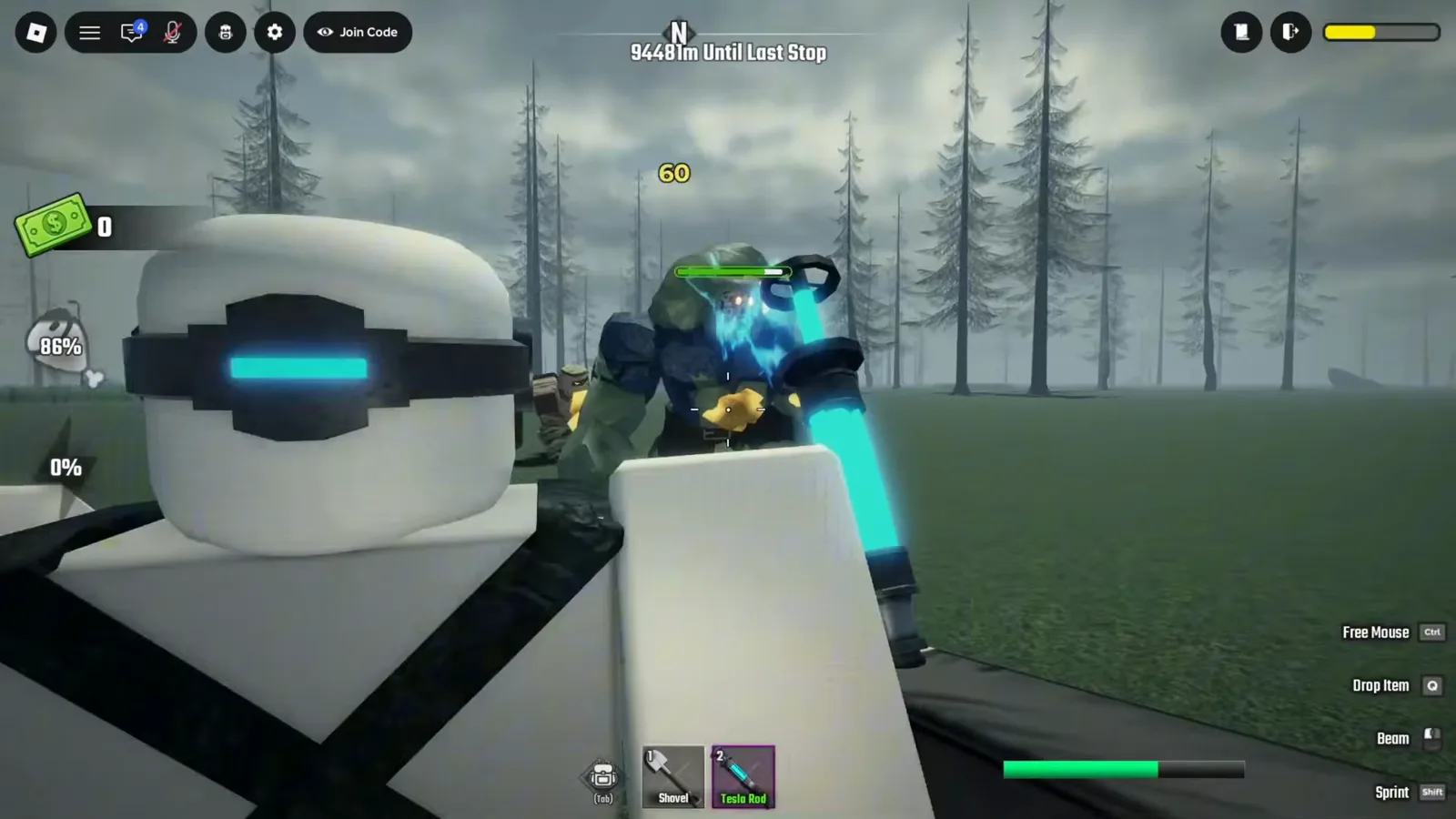
In the field the static mechanic is visible — a teammate in the white-and-blue Electrocute suit, a zombie wrapped in blue arc lightning, a 60 damage number popping off it. But 60 is not the Level 1 figure of 5 damage, so that number belongs to whatever the presenter had set up, not to a fresh class.
The Pirate’s Net Gun is a crossbow-shaped launcher — ammo reading 1/0, a body on the road to the left wrapped in rope netting — and a wheeled deck cannon matching the card’s wording stands on the highway among the fallen.
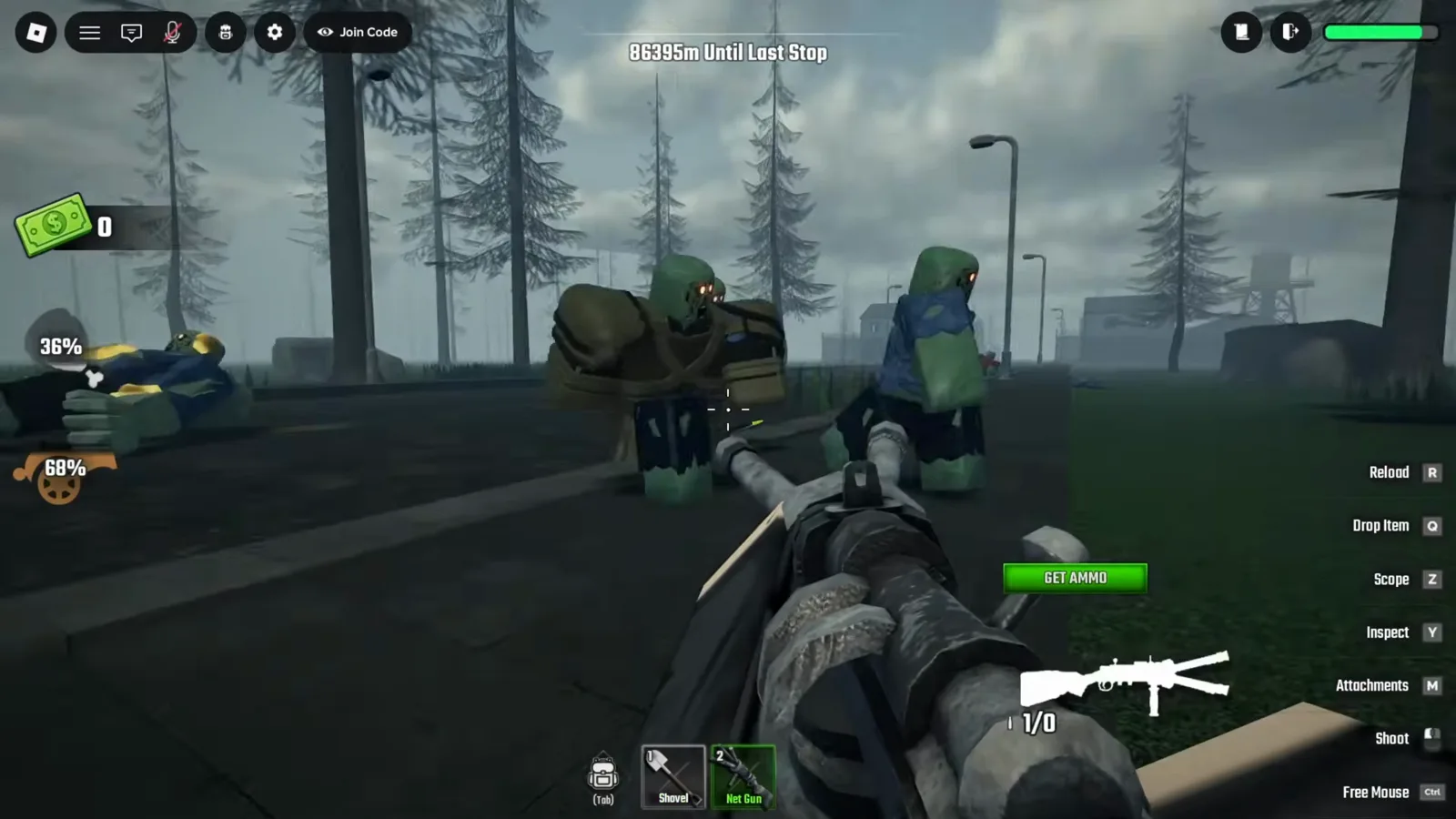
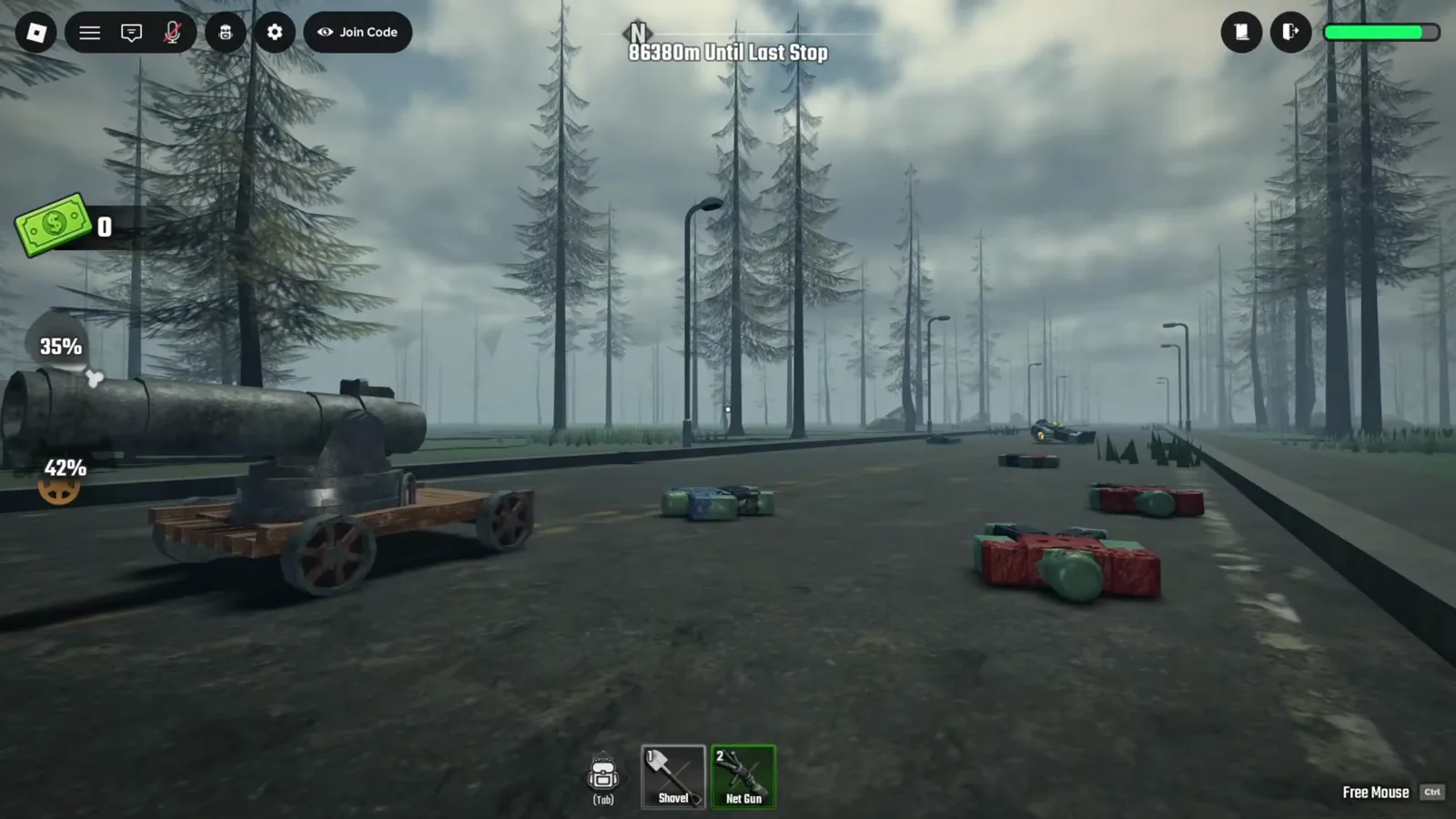
We cannot say the cannon was called down by the class rather than placed there, and the Aquatic fins are the least demonstrated of the four — no frame we checked shows them swimming.
What has not been verified about classes yet?
Worth listing plainly:
- The full roster. The list scrolls, one row above Ninja is never legible, and neither video opens a Vampire, Ghoul or Ninja card. Their abilities, prices and starter items are unknown to us.
- Whether Out of Stock blocks a purchase. The frames show a price without a button, and nothing more.
- How class levels rise, and what the padlocked perks unlock with.
- Whether more classes are Robux-priced. Necromancer is the only one shown that way.
- Per-class deep pages. The numbers above came off cards, not from testing.
Tickets are the binding constraint early, and today’s codes are the cheapest way to stack them — the same currency that buys bus upgrades and that loot selling feeds between runs. A class changes how a run feels; the beginner guide covers what actually ends runs, and the badge list is where these mechanics pay off. The narration in the class-menu footage credits the Ocean Biome update with the Pirate, Aquatic and Electrocute entries, and every update so far has touched the roster — so date-check anything you read elsewhere against the 19 September 2026 deploy.
Source
The class menu, roster labels, prices and perk wordings on this page are from the video The Ocean Biome in Last Stop is INSANE! by VanYT, specifically the 565s (?t=565), 568s (?t=568), 572s (?t=572) and 578s (?t=578) frames of the 9:24–9:40 class-menu segment; the channel’s added overlay text appears elsewhere in that video, so frames carrying it were excluded. The Tesla Rod, Electrocute suit, Net Gun and deck cannon frames are from ALL NEW CLASSES SHOWCASE In Last Stop! by floppys, at 22s (?t=22), 30s (?t=30), 296s (?t=296), 312s (?t=312) and 364s (?t=364); the Cmdr console visible at 26s of that video is why the caveat above exists. All wordings were re-read from native-resolution frames on 23 September 2026. Text is our own write-up; frames are used with attribution.
Related Articles
guides
Last Stop Roblox Crafting: Every Recipe Cost We Have Verified So Far
Last Stop Roblox crafting, checked frame by frame: the Workbench prompt, ten recipe costs, Locked Recipes, and the lobby Workbench Shop's Ticket prices.
guides
Last Stop Roblox Ocean Tokens: How to Earn Them and What the Ocean Spin Pays
Ocean Tokens in Last Stop Roblox: the oil-rig kill drop behind the +1 OceanToken toast, the OCEAN code, and every prize on the 15-token Ocean Spin board.
guides
Last Stop Roblox Alien Tokens: How to Farm Them and Win the Alien Spin
Alien Tokens explained: where aliens spawn, how every kill drops a token, and how the 15-token lobby spin rolls for the Alien Bus at 1% with a 50-spin pity.
Was this helpful?
Thanks for the feedback!